

Best Ergonomic Chair Lumbar Support in 2026
Posted by Meliusly
Most advice about lumbar support starts with the wrong question. Buyers ask how thick, soft, or plush a lumbar pillow feels, then add more padding when the chair still doesn't work. In practice, the best ergonomic chair lumbar support is usually the support that lands in the right place and stays there, while the seat beneath you keeps the pelvis at a stable height.
That distinction matters for office chairs, dining chairs used as workstations, recliners, and older upholstered furniture. A backrest can have a convincing lumbar curve and still miss your anatomy. A soft cushion can feel pleasant for a few minutes and then push your pelvis forward. A sagging seat can undermine every adjustment above it.
The practical approach is to inspect the complete seating system: seat height, seat depth, lumbar position, recline, cushion condition, and foundation support. Meliusly has served over 400,000 customers with furniture support solutions designed to extend the useful life of sofas, chairs, sleeper sofas, and beds. That same repair-first mindset applies here. Adjust what can be adjusted, reinforce what has collapsed, and replace the chair only when its structure no longer gives you a sound base.
Why Thicker Lumbar Pillows Often Fail
A thick lumbar pillow fills space, but filling space isn't the same as supporting the lumbar curve. When a bulky cushion presses hard into the small of your back, it can move your trunk forward relative to the seat. Your pelvis may rotate, your thighs may lose comfortable contact with the seat, and pressure can concentrate at the front edge or around the lower ribs.
That doesn't mean every aftermarket pillow is poor. A modest, well-shaped support can solve a genuine gap in a flat backrest. The failure comes from treating softness and thickness as universal measures of quality. Human backs don't share one identical curve, and a pillow that feels supportive to one person can feel intrusive to another.
Practical rule: Support the curve. Don't wedge the spine into a shape it doesn't naturally occupy.
Filling a gap versus guiding alignment
A useful lumbar support contacts the lower back without forcing the pelvis away from the backrest. If you sit down and immediately feel your hips sliding forward, the support is probably too deep, too low, or both. If the cushion compresses until you no longer feel it, its initial comfort may have come from softness rather than useful positioning.
The backrest also has to work with the seat pan. A seat that slopes backward or has lost its foam can place the pelvis in a position that makes a correctly placed lumbar pad feel excessive. In that case, increasing pillow thickness treats the symptom while worsening the geometry.
What softness can and can't do
Soft foam can reduce the harsh sensation of a rigid contact point. It can't compensate for a fixed lumbar bulge that sits above or below your natural curve, and it can't restore a collapsed seat foundation. The 2023 office-chair experiment reported that 39% of participants were classified as pain developers during prolonged sitting, while the combination of lumbar support and seat-pan tilt produced the most neutral spine and pelvic postures in the study report. The same research found that posture improvements didn't eliminate clinically significant sitting-induced pain for a large portion of the sample.
That result supports a restrained conclusion. Lumbar support is important, but it isn't a cure for every discomfort associated with sitting. If your chair's seat is sinking, your feet can't settle, or your backrest locks you into one position, a thicker pillow is unlikely to be the structural fix.
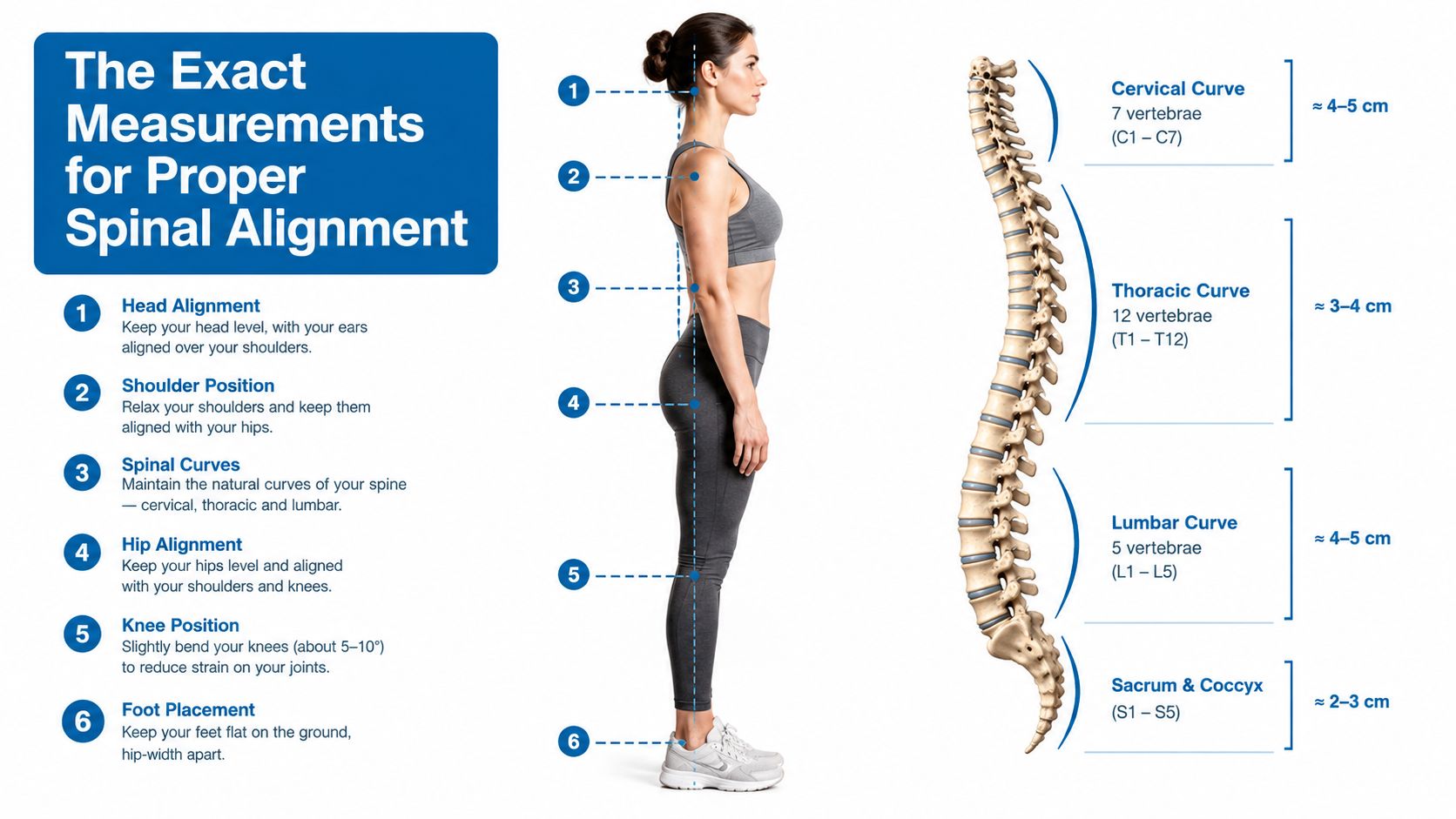
The Exact Measurements for Proper Spinal Alignment
A thicker lumbar pillow is not automatically better. Vertical adjustability matters more because the support must meet your lumbar curve, not just fill more space. Depth and pressure adjustment also help, particularly when a fixed backrest pushes too firmly or fails to contact the lower back.
A foundational ergonomic study found a mean preferred lumbar-support height of 190 mm above the compressed seat surface and a mean preferred depth of 387 mm. The authors concluded that the lumbar support point should adjust from 150 mm to 250 mm above the compressed seat so most users can reach their preferred setting according to the PubMed record for the study.
Why vertical adjustment matters most
The 150 mm to 250 mm range covers a meaningful difference in seated anatomy. A fixed support may fit if its molded curve happens to meet your lower back, but it cannot correct a mismatch. Too high, it can press into the mid-back. Too low, it may push against the pelvis or miss the hollow above it.
The preferred settings in the study varied across the adjustment range. That makes vertical movement a practical fit requirement for chairs used by people with different body sizes, rather than a decorative premium feature. Check the stated height range before buying. “Integrated lumbar support” says little if the mechanism cannot move to the correct level.
The lumbar region sits between the pelvis and thoracic spine, so its position is easier to judge with an anatomical reference. This clinician lumbar spine model guide shows the lower-spine area a chair should contact. You do not need to memorize vertebral landmarks. You do need to distinguish contact with the lower back from pressure against the back of the pelvis.
Seat depth changes the result
Lumbar height cannot be assessed independently from seat depth. A seat that is too deep may prevent you from sitting fully back without pressure behind the knees. A seat that is too short may leave the thighs unsupported, prompting you to shift and lose the intended lumbar contact.
Use this seat depth ergonomics guide to check the distance between the seat edge and the backs of your knees. Leave two to three finger-widths of clearance, as described in occupational seating guidance. Your feet should rest flat, and common ergonomic guidance places seat height around 16 to 21 inches from the floor in this chair-selection guidance.
These measurements will not identify one perfect chair. They will expose a backrest whose lumbar support cannot reach the position your body needs, and they help separate a positioning problem from a seat foundation that needs repair.
Comparing Built-In Adjustability and Aftermarket Additions
There are three practical routes to better lumbar support. You can buy a chair with a movable built-in mechanism, add a separate cushion or pad to an existing backrest, or reinforce a weak seat with a rigid support board. These options solve different problems, so comparing them only by price or softness leads to poor decisions.
| Support Type | Adjustability | Durability | Best Use Case |
|---|---|---|---|
| Built-in adjustable lumbar | Often adjusts by height, depth, or pressure | Usually integrated into the chair's mechanism | Daily desk work where precise fit matters |
| Aftermarket memory-foam pillow | Easy to reposition, but may shift during use | Foam can compress and straps or covers can wear | Testing a support position or improving a basically sound chair |
| Rigid support board | Little direct lumbar adjustment | Structurally stable beneath a cushion | Sagging seats, recliners, and upholstered chairs with a failed base |
Built-in systems
A built-in mechanism is the strongest choice when several people use the chair or when you sit for long work periods. Height adjustment lets you align the contact point with your lower back. Depth or pressure adjustment lets you reduce the force when the support feels intrusive.
The trade-off is complexity. More mechanisms mean more parts that can loosen, wear, or become difficult to repair. A chair with many controls still isn't a good fit if its seat depth is wrong or its lumbar range is narrow. For a broader office-chair search, this guide can help you find your perfect office chair by comparing the complete adjustment package rather than focusing on one lumbar knob.
Aftermarket pillows
A separate pad is useful when the backrest is structurally sound but lacks a suitable curve. It lets you test height and thickness before committing to a new chair. This can be a sensible approach for a home office, a temporary workstation, or a chair that otherwise fits your body.
The weak point is stability. Straps can loosen, the pillow can migrate as you recline, and foam can lose its original shape. A pad that feels correct while you're sitting still may move when you reach, turn, or change recline. Use the chair cushion guidance from Meliusly when evaluating a cushion as part of the seat system, not as an isolated comfort object.
Rigid support boards
A rigid board doesn't create a custom lumbar curve. It works below the cushion by restoring a firmer, more level seat base when the original webbing, springs, or support deck has sagged. That can reduce the backward pelvic tilt caused by sinking and give the backrest a chance to contact the lower spine correctly.
This option makes sense for recliners, upholstered chairs, and older seating where the backrest isn't the only failure. It won't correct a lumbar bulge that sits too high, and it isn't a substitute for an adjustable office chair when precise task-chair fit is required. Its advantage is structural stability, not plushness.
A lumbar pillow can't repair a seat pan that has stopped holding your pelvis at the intended height.
Choose built-in adjustability for daily desk work and shared use. Choose an aftermarket pad when the chair fits and only the contact point needs refinement. Choose structural reinforcement when the seat itself has collapsed.
How to Measure Your Torso and Test Your Current Chair
A tape measure, straight edge, and controlled test can reveal whether your chair needs a small correction or a structural fix. The goal is not diagnosis. It is to determine whether the chair's geometry can support your body after adjustment, or whether added padding would only hide a poor fit.
Start with the seat
- Sit fully back with your feet flat. Let your shoulders relax instead of pulling yourself upright.
- Check the space between the seat front and the backs of your knees. Keep roughly two to three finger-widths of clearance. This prevents the seat edge from pressing into the legs while leaving enough surface to support the thighs.
- Measure from the compressed seat surface to the point where the backrest first meets the hollow of your lower back.
- Take the measurement in your natural posture. Do not arch aggressively just to reach the backrest.
Record that distance as your working reference. A chair may advertise lumbar adjustment, but the adjustment range only helps if it reaches the area where your torso contacts the support. A support positioned several centimetres too high can feel hard and intrusive, while one set too low may push against the pelvis instead of supporting the lumbar curve.
Locate the contact area
Slide a hand behind your lower back and find the inward curve above the pelvis. Avoid forcing your fingers toward a specific spinal level. The practical test is simpler: the support should meet the lower-back hollow, not the sacrum, pelvic bones, or mid-back.
Test the chair in three positions:
- Upright: Does the support touch gently without pushing your hips forward?
- Reclined: Does contact remain as the backrest moves?
- Working reach: Can you lean toward the desk without losing support entirely?
Support should remain noticeable without demanding constant resistance. If you brace against it, lower the support, reduce its depth, or remove an added pad before testing again. A thicker cushion is often the wrong correction when the contact point is vertically misplaced.
Separate the backrest from the seat
Place a firm, thin layer beneath the seat cushion temporarily, then repeat the test. If your pelvis feels steadier and the lumbar contact improves, the seat foundation may be lowering your body relative to the backrest. If the result stays the same, examine backrest geometry and seat depth instead.
Change one variable at a time. Sit naturally, then assess pressure, reach, pelvic position, and lumbar contact together. This controlled method takes longer than buying a softer pillow, but it shows whether the chair needs adjustment, added support, or a repair to the seat beneath you.
The Hidden Problem of Sagging Seat Foundations
A sinking seat changes the angle of your entire body before lumbar support even enters the picture. As foam compresses or webbing loses tension, the pelvis can settle lower and rotate backward. The lower back then moves away from the backrest's intended contact zone, so the chair's lumbar curve may feel too high, too aggressive, or strangely ineffective.
That failure often gets misread as a backrest problem. People add a pillow, increase cushion thickness, or replace the chair, even though the seat deck is no longer carrying weight evenly. In upholstered furniture, comfort depends on the relationship between the cushion, the support beneath it, and the frame. A soft top layer can't restore a weakened foundation by itself.
Inspect before you add padding
Remove the loose cushion if the chair design allows it. Look for a visibly depressed center, uneven seat height, broken support elements, or a cushion that bottoms out when you sit. Press across the surface with your hand and compare the center with the front and side areas. A deep, localized collapse suggests a foundation or foam problem rather than a lumbar-support preference.
In an office chair, inspect the seat pan for deformation and check whether the height mechanism still holds position. In a recliner or upholstered chair, pay attention to the deck beneath the cushion. If the seat drops noticeably under load, the backrest can't maintain the relationship it had when the furniture was new.
Restore the base before tuning the back
A rigid support board beneath a sagging cushion can create a more stable platform and reduce the pelvic sink that makes lumbar support miss its target. It won't turn a fixed backrest into an adjustable one, but it can restore the seat height and pitch enough for the existing contour to work more naturally.
Repair thinking saves money. If the frame and upholstery remain serviceable, reinforcing the seat may be more rational than replacing the entire chair. Meliusly offers furniture support products for sagging sofas, chairs, sleeper sofas, bunkie boards, and bed slats, including support boards intended to sit beneath cushions. Use the appropriate product for the furniture type and confirm that the board fits securely without interfering with the reclining mechanism or frame.
Restoration principle: Fix the load-bearing layer before fine-tuning the comfort layer.
Don't place a rigid board where it can slide, obstruct moving hardware, or create a sharp pressure point. The support should sit flat and remain contained by the furniture's structure. After installation, reassess seat height, foot contact, knee clearance, and lumbar position before adding any pillow.
A repaired foundation also deserves periodic inspection. Cushions compress, fasteners loosen, and older materials can continue to deteriorate. Structural support isn't a one-time substitute for fit, but it can prevent a sound backrest from being blamed for a failing seat.
Choosing the Right Support for Your Specific Seating Setup
The right purchase depends less on the label “ergonomic” than on what has failed. A corporate worker with a well-built task chair usually needs adjustment range. A remote worker using a dining chair may need to correct seat height and provide modest back support. A homeowner with a sagging recliner may need a structural repair before considering lumbar padding.
For daily office work
Choose a chair with vertical lumbar adjustment, useful seat-depth control, a stable seat pan, and a backrest that can recline. A recline angle around 100 to 110 degrees, combined with approximately 4 cm of lumbar support depth, has been summarized in chair-ergonomics sources as helping maintain lumbar lordosis near 45 to 50 degrees in this biomechanics overview. Treat those figures as a design reference, not a command to force your back into a single angle.
A dynamic interface may also be preferable to rigid bracing for some users. A 2024 study reported that a dynamic seat cushion reduced the risk of neck pain by 81% and low back pain by 84% during work, while improving trunk muscle performance in the published study. The result doesn't prove that every moving cushion will work for every person, but it supports testing movement rather than assuming firmer is always better.
For a dining chair or temporary workstation
Start by checking seat height and depth. If your feet don't rest flat or the seat edge presses behind your knees, a lumbar pillow won't solve the underlying mismatch. A thin, stable cushion may help, but avoid stacking soft layers that raise you toward the desk while pushing your back away from the backrest.
For additional background on workstation fit and body positioning, read this ergonomics guide. If the chair is only a short-term solution, spend on a reversible adjustment rather than a complex mechanism that the furniture can't securely support.
For a sagging recliner or upholstered chair
Inspect the seat foundation first. If the cushion sinks, a fitted support board beneath it is the more logical first purchase. Once the base holds you at a consistent height, test the existing backrest again. Add a small lumbar pad only if the remaining gap is specific and stable.
For buyers comparing office-chair features with a lower-back focus, this guide to the best chair for lower back relief offers another perspective on evaluating the whole chair rather than the cushion alone. If discomfort persists despite a sound fit and stable furniture, consult a qualified clinician instead of escalating support pressure.
Meliusly offers practical support solutions for sagging chairs, sofas, sleeper sofas, beds, and related furniture foundations, helping you repair the structural problem before replacing usable furniture. Visit Meliusly to choose a support product for your seating setup and restore a firmer, more reliable base for lumbar comfort.